
Build an AI Agent with Real‑Time Web Search in JavaScript
Large language models (LLMs) are great at answering questions, but they have an important limitation: they don’t inherently have access to what’s happening on the web right now.
Ask an LLM about a programming concept and it can probably answer from its existing knowledge. Ask it about the latest JavaScript frameworks, today’s news, or the current price of a product, and its answer may be outdated.
One way to solve this is to give the model a tool or capability that can search the web before concluding its answer. A form of Retrieval-Augmented Generation (RAG) technique.
You might have already seen this pattern in modern AI assistants. For instance, here’s what it looks like in Gemini.
In this concise tutorial, we’ll build something similar but slightly bare-bones. A small AI agent in JavaScript that can decide when it needs to search the web, use SearchApi to retrieve Google search results, and then use those results to formulate its answer.
$ node agent.js "What are the latest developments in PHP 8.5?"

🤖 Thinking...

🔎 Searching the web for: "PHP 8.5 latest developments release"
📄 Found 5 results.

🤖 Thinking...
...
As you can tell, if the question requires a web search, the agent will perform the web search and then use the results to answer the question/prompt.
- What Makes Something an AI Agent?
- What We’re Going to Build
- Prerequisites
- Connecting to the LLM
- Give the AI a Search Tool
- Implement search_web() with SearchApi
- The Agent Loop
- Run the Agent
- Why This Is an Agent
- Taking the Agent Further
- In Closing
What Makes Something an AI Agent?
Before we dive into building our AI agent, let’s quickly understand what makes something an AI agent.
So, a regular LLM would typically take a prompt and generate a response based on its training data. Meaning, the response you get might be outdated or not relevant to the current context and that’s not ideal when you’re looking for up-to-date information.
User → LLM → Answer
On the other hand, an LLM with a tool can take a prompt, decide if it needs to use a tool (like a web search), use that tool to get real-time information, and then generate a response based on that information. If the tool is not needed, it can just generate a response based on its training data.
User → LLM → Tool → Result → LLM → Answer
The important distinction here is that the LLM doesn’t execute the tool itself. It decides that a tool is needed and generates a structured tool call. Our application executes the function and sends its result back to the model.
For instance, OpenRouter (the API gateway for LLMs), which we are going to use in this tutorial, exactly describes this as tool calling. It essentially gives an LLM access to external tools.
And this leads us to the agent loop. The agent loop is a process where the LLM can decide to use a tool, get the result, and then decide if it needs to use another tool or generate a final answer. This loop continues until the LLM decides it has enough information to answer the user’s question.
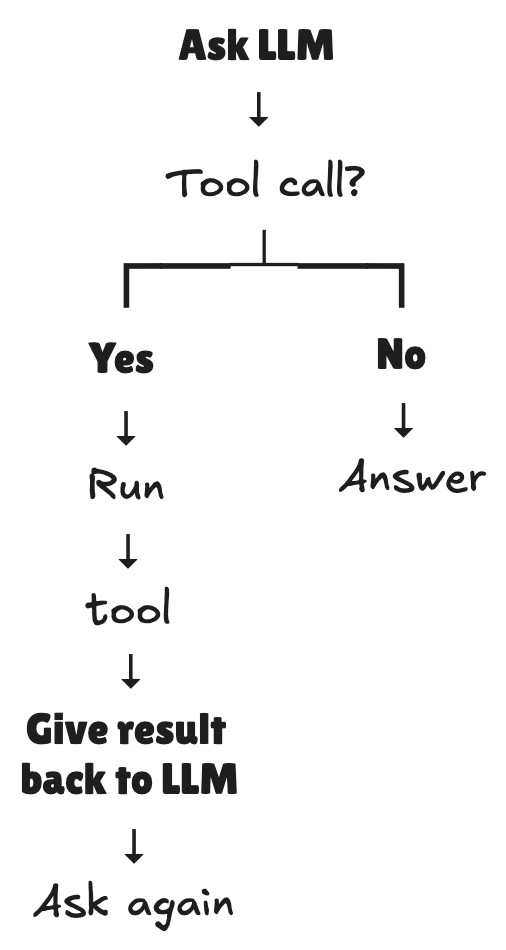
An agent doesn’t have to be a complicated framework. At its simplest, it’s an LLM, a set of tools, and a loop that allows the model to act on the results.
OpenRouter’s own documentation calls this a simple agentic loop.
What We’re Going to Build
Like I said previously, we’re going to build a small AI agent in JavaScript that can decide when it needs to search the web, use SearchApi to retrieve Google search results, and then use those results to formulate its answer. The flowchart of our agent looks like this.
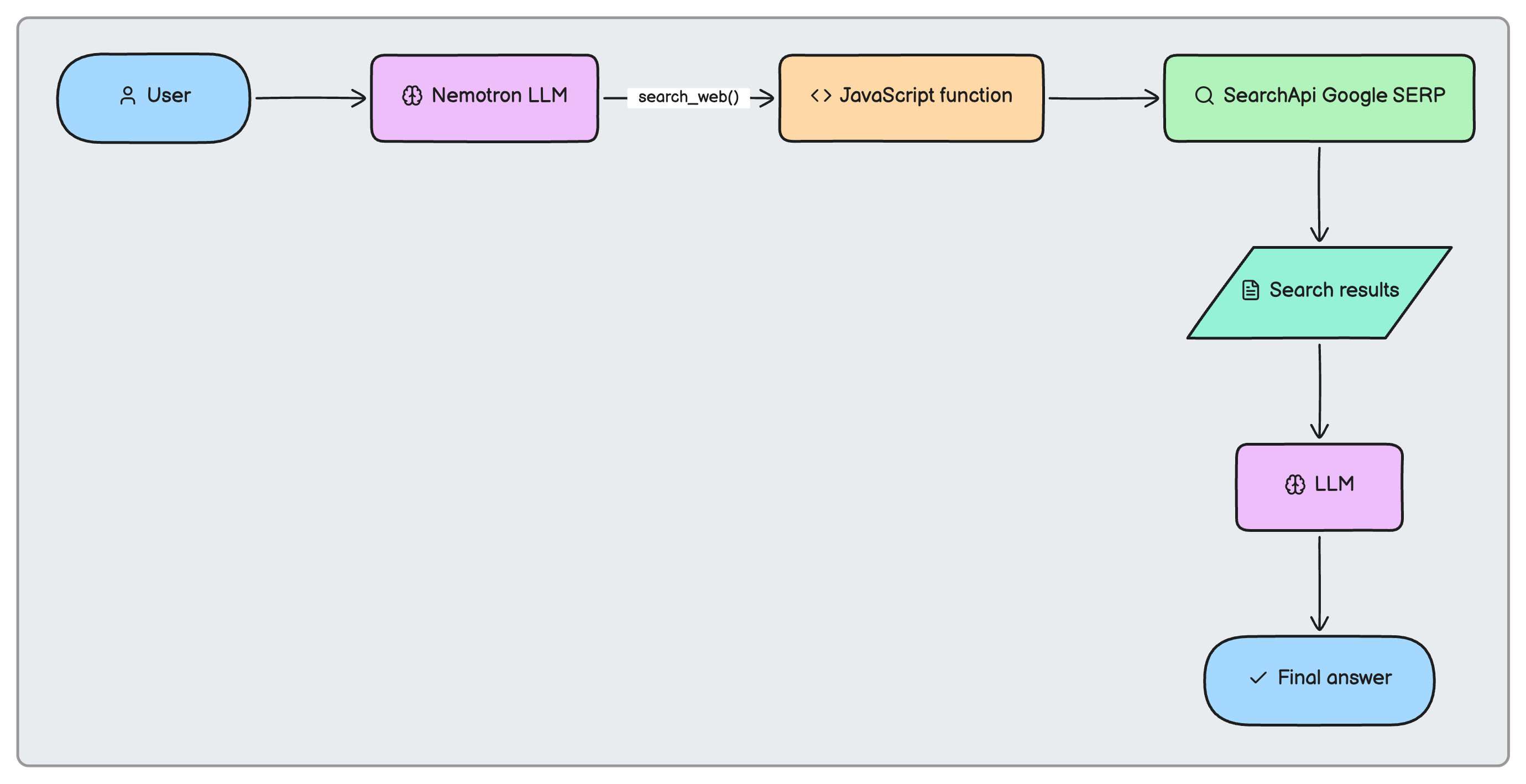
Let’s address all the jargon in the flowchart above so that we understand what all the components do.
- Nemotron — It’s one of OpenRouter’s free LLMs that decides whether it needs to search and what query to use.
- JavaScript — Orchestrates the agent and executes tools.
- SearchApi — Retrieves real-time Google search results.
- Agent loop — Feeds tool results back into the LLM.
With that out of the way, let’s get started with building our AI agent.
Prerequisites
To build this AI agent, you’ll need the following:
- Node.js 20+
- An OpenRouter API key
- A SearchApi API key
Once you have these, run the following commands to create a new Node.js project and install the required dependencies.
mkdir web-search-agent
cd web-search-agent
npm init -y
npm install openai dotenv
Now, create a .env file in the root of your project and add your OpenRouter and SearchApi API keys like so.
OPENROUTER_API_KEY=your_openrouter_api_key
SEARCHAPI_API_KEY=your_searchapi_api_key
For this tutorial, I’m using OpenRouter’s Nemotron 3.5 Lightning model, which is a free model that has the capability to decide when it needs to search the web and what query to use. You can use any other model that has the same capability, but for this tutorial, we’ll stick with Nemotron.
Also, you get a free SearchApi API key that allows you to make 100 requests, which is more than enough for this tutorial. If you need more, you can upgrade to a paid plan.
Connecting to the LLM
Create a new file called agent.js in the root of your project and add the following code to connect to the OpenRouter API.
import "dotenv/config";
import OpenAI from "openai";

const client = new OpenAI({
  baseURL: "https://openrouter.ai/api/v1",
  apiKey: process.env.OPENROUTER_API_KEY,
});
As discussed previously, we’re using OpenRouter’s API to connect to the Nemotron model.
const MODEL = "nvidia/nemotron-3.5-lightning:free";
Give the AI a Search Tool
Next, we need to give the AI a tool that it can use to search the web. For this, we need a tool definition.
const tools = [
  {
    type: "function",
    function: {
      name: "search_web",
      description:
        "Search the web for current information. Use this when the user asks about recent, current, or up-to-date information.",
      parameters: {
        type: "object",
        properties: {
          query: {
            type: "string",
            description: "The search query to send to Google.",
          },
        },
        required: ["query"],
      },
    },
  },
];
Notice, we’re not giving the LLM the implementation of search_web(). We’re giving it a description of what the function does and the parameters it accepts.
The model can then generate:
{
  "type": "function",
  "index": 0,
  "id": "call-03f0d876-015c-403e-b2de-3f28973dacc1",
  "function": {
    "name": "search_web",
    "arguments": {
      "query": "latest JavaScript frameworks 2026 trends web development"
    }
  }
}
OpenRouter’s documentation uses the same pattern: define a function schema, receive tool_calls, execute the requested function in your application, and return the result to the model.
Implement search_web() with SearchApi
Next, we need to implement the search_web() function that will use SearchApi to retrieve Google search results.
async function searchWeb(query) {
  console.log(`\n🔎 Searching the web for: "${query}"`);

  const url = new URL("https://www.searchapi.io/api/v1/search");

  url.searchParams.set("engine", "google");
  url.searchParams.set("q", query);

  const response = await fetch(url, {
    headers: {
      Authorization: `Bearer ${process.env.SEARCHAPI_API_KEY}`,
    },
  });

  if (!response.ok) {
    const error = await response.text();

    throw new Error(
      `SearchApi request failed (${response.status}): ${error}`
    );
  }

  const data = await response.json();

  /*
   * We don't need to send the entire SearchApi response
   * back to the LLM. Extract the useful organic results.
   */
  const results = (data.organic_results || [])
    .slice(0, 5)
    .map((result) => ({
      title: result.title,
      link: result.link,
      snippet: result.snippet,
    }));

  console.log(`📄 Found ${results.length} results.`);

  return results;
}
Why SearchApi? An AI agent needs a reliable way to access fresh information from the web. SearchApi provides structured search results through an API, so we can expose web search as a tool without having to build or maintain our own scraping infrastructure. That makes it a natural fit for an agent that needs to ground its answers in current web data.
The Agent Loop
Lastly, we need to build the agent loop that will allow the LLM to decide when it needs to search the web and when it has enough information to answer the user’s question.
async function runAgent(userQuestion) {
  const messages = [
    {
      role: "system",
      content:
        "You are a helpful research assistant. Use the search_web tool whenever you need current information. After receiving search results, use them to answer the user's question. Mention the sources you used by including their URLs.",
    },
    {
      role: "user",
      content: userQuestion,
    },
  ];

  /*
   * The agent can go through multiple tool calls.
   *
   * For example:
   *
   * LLM → search_web()
   *     → search_web()
   *     → final answer
   */
  for (let i = 0; i < 5; i++) {
    console.log(`\n🤖 Thinking...`);

    const response = await client.chat.completions.create({
      model: MODEL,
      messages,
      tools,

      /*
       * We don't need the model's reasoning output for this demo.
       */
      reasoning: {
        exclude: true,
      },
    });

    const message = response.choices[0].message;

    /*
     * Add the assistant's response to the conversation.
     */
    messages.push(message);

    // No tool call means the agent has its final answer.
    if (!message.tool_calls?.length) {
      return message.content;
    }

    /*
     * Execute every tool requested by the AI.
     */
    for (const toolCall of message.tool_calls) {
      if (toolCall.function.name === "search_web") {
        const { query } = JSON.parse(toolCall.function.arguments);

        const results = await searchWeb(query);

        messages.push({
          role: "tool",
          tool_call_id: toolCall.id,
          content: JSON.stringify(results),
        });
      }
    }
  }

  throw new Error("Agent reached the maximum number of tool calls.");
}
As you can tell, the user prompts the agent with a question. The code then checks if the model requested the tool.
if (!message.tool_calls?.length) {
  return message.content;
}
If so, it extracts the arguments from the tool call.
const { query } =
  JSON.parse(toolCall.function.arguments);
Then, it executes the search_web() function and sends the results back to the model.
const results = await searchWeb(query);
And finally, it adds the tool’s response to the conversation.
messages.push({
  role: "tool",
  tool_call_id: toolCall.id,
  content: JSON.stringify(results),
});
Ask the LLM again, and it will either request another tool call or provide its final answer. And that’s how the agent loop works.
This maps almost exactly to OpenRouter’s documented three-step tool-calling flow and its simple agentic loop.
Run the Agent
Add the following piece of code to take a question from the command line and run the agent.
/*
 * Run the agent.
 */

// eg. "What are the latest JavaScript frameworks for building websites in 2026?"
const question = process.argv.slice(2).join(" ");

if (!question) {
  console.error('Usage: node agent.js "your question"');
  process.exit(1);
}

console.log(`\n👤 User: ${question}`);

try {
  const answer = await runAgent(question);

  console.log("\n\n💬 Agent:\n");
  console.log(answer);
} catch (error) {
  console.error("\n❌ Error:");
  console.error(error);
}
Now, you can run the agent with a question like so.
$ node agent.js "Who won the nobel prize in chemistry 2025?"
The workflow of the agent will look like this.
The same way, you can ask a different question. For instance…
$ node agent.js "What are the best developer laptops available right now?"
And the agent will search the web and provide an answer based on the latest information.
If you just want to see the project in action, you can check out the GitHub repository. Fork it, add your OpenRouter and SearchApi API keys in the
.envfile, and you’re good to go.
Why This Is an Agent
You might be wondering, “Amit! Isn’t this just an LLM calling an API?”
Well, no.
The key difference is that the thing we built here can interpret a natural-language request, decide whether it needs external information, select a tool, generate the tool’s arguments, consume the tool’s result, and then produce a final response.
And most importantly, we didn’t tell it when to search or exactly what query to send. We gave it a capability and let the model decide how to use that capability.
Taking the Agent Further
As for taking this agent further, you can, for instance, make the agent do multiple searches and combine the results to answer a question.
Let’s say the user asks, “Compare Astro, Next.js, and Nuxt for building a content-heavy website.” The agent could search each technology independently and synthesize the results.
You can also utilize SearchApi’s broader API offering that gives you opportunities to add specialized capabilities around things like shopping, Maps, News, YouTube, and other search engines/data sources.
So your agent could evolve from:
search_web()
into:
search_web()
search_news()
search_shopping()
search_maps()
search_youtube()
This would make your agent more capable and versatile, allowing it to answer a wider range of questions with real-time information.
In Closing
We’ve built a small but functional AI agent without an agent framework. The LLM decides when it needs information, our JavaScript application executes the requested tool, SearchApi retrieves the latest search results, and the results are fed back into the model.
The interesting part isn’t the amount of code. It’s the architecture: an LLM becomes considerably more useful when you give it tools it can decide to use.
From here, you can add more tools, support multiple searches, introduce memory, or turn the CLI into a full-fledged web application. The possibilities are endless.

👋 Hi there! This is Amit, again. I write articles about all things web development. If you enjoy my work (the articles, the open-source projects, my general demeanour... anything really), consider leaving a tip & supporting the site. Your support is incredibly appreciated!